
The State Admin is the highest-level authority within the RTE–MIS system. They are responsible for managing the overall execution of the RTE admissions campaign in their state — from configuring users and locations to monitoring school and student activities.
This section outlines the key functions available to the State Admin and their corresponding workflows.
1. State admin dashboard
After logging in, the State Admin Dashboard serves as the landing page. It displays a summary of state-level updates, including:
- Status of key campaign tasks.
- District-wise and block-wise progress of applications.
- Real-time insights and alerts for ongoing activities.
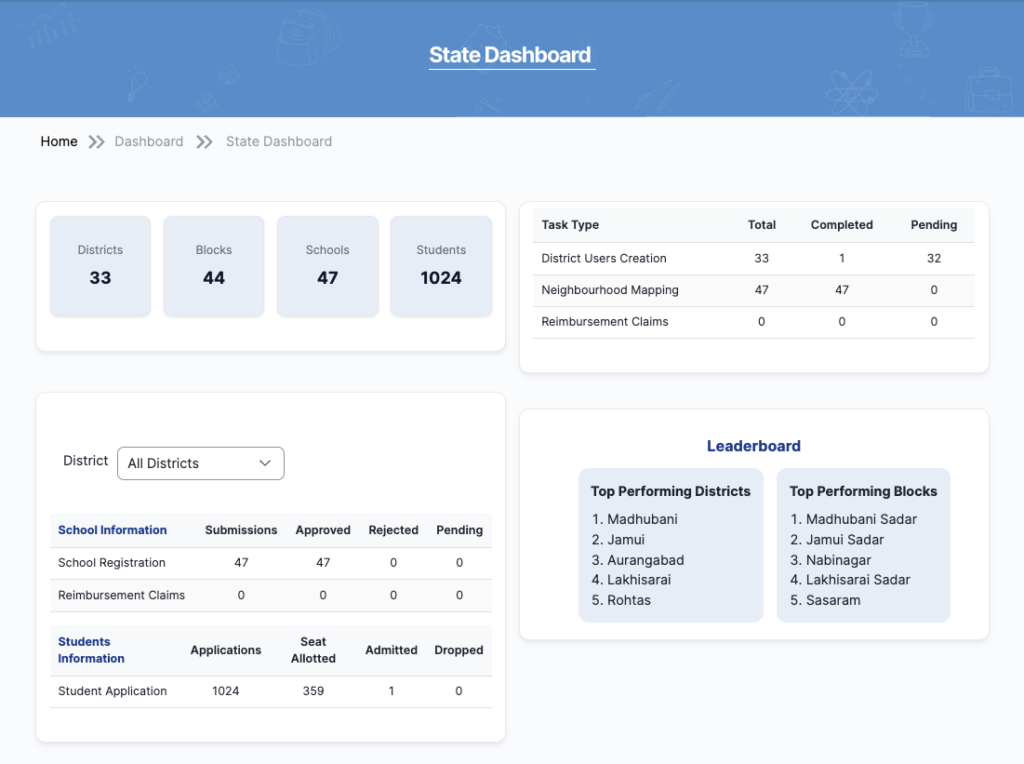
The dashboard helps the State Admin monitor overall campaign performance and take timely administrative actions.
2. User Creation and Management
2.1 District user creation
- The State Admin is responsible for creating and managing District Admin accounts.
- Once a district user is created, the system automatically sends an email and SMS notification to the registered contact details for account verification.
- Districts available for user creation are displayed from the district master table in the database.
- Existing district user details can be edited directly from the frontend as needed.

The existing district admin details are editable from the frontend with a simple click.
User Validation through OTP
- During user creation, both email and phone numbers are verified using an OTP (One-Time Password).
- OTPs are valid for 2 minutes, ensuring quick and secure validation.
- The State Admin should coordinate with the user to complete verification promptly.

2.2 Block user creation
- District Admins are primarily responsible for creating Block Admins.
- However, State Admins can also create or modify Block Admin accounts if required.

3. Setting up RTE admissions cycles:
The State Admin manages the academic and admission cycle setup for their state.
This includes creating, scheduling, and modifying key events for the annual RTE campaign.

Available Campaign Events:
- School Registration
- School Renewal
- School Verification
- School Mapping
- Student Application
- Student Application Verification
- Lottery
- Post-Lottery School Admissions
- Student Tracking
- Reimbursement Claim
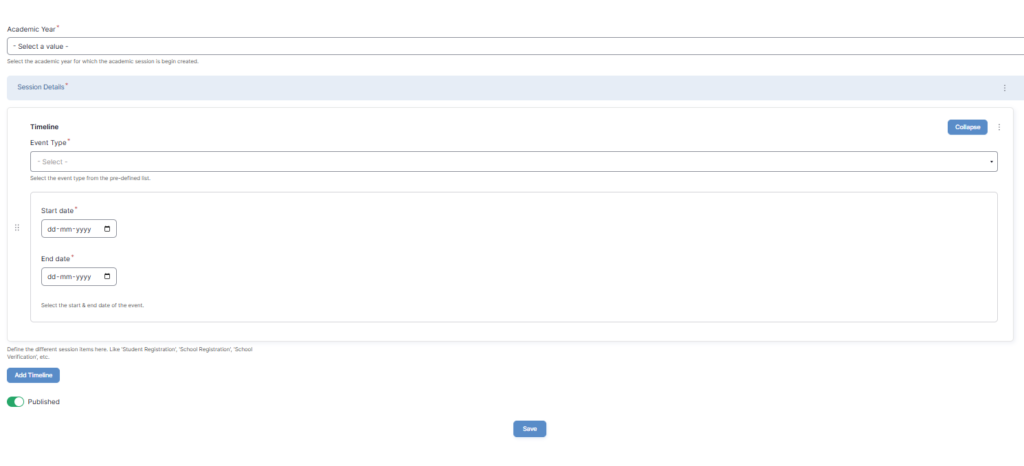
Key Notes:
- Only the current academic year can be selected while setting up new events.
- All available events are dynamically fetched from the system database.
- State Admins can add, edit, or reschedule events based on administrative requirements.
4. Adding Location Levels
The State Admin can add or modify the state’s geographical structure to ensure location data is accurate and consistent.
- Locations can be uploaded in bulk using Excel or CSV templates.
- New locations can also be added manually through the platform.
- This setup supports district, block, ward, gram panchayat, and habitation-level mapping for all modules.
5. Reimbursement Configuration
Setting Up Reimbursement Process: State Admins configure the reimbursement workflow, which defines how schools claim and receive reimbursements for RTE admissions.
- The setup includes defining eligibility criteria, claim submission timelines, and verification steps.
- Once configured, the reimbursement process applies to all schools within the state.

Fee Structure Setup
- The State Admin defines the reimbursement fee structure for schools under different boards and education levels.
- Once finalized, the structure automatically applies to all schools.
- Only the State Admin can modify this fee structure in the future.

6. Mapping Schools to Locations
State Admins can manually map each school to its appropriate district, block, and area type (urban/rural).
- This ensures every school is correctly linked to its location.
- The mapped data directly supports the student application module, enabling parents to select eligible schools within their neighborhood.
7. Monitoring School Activities
The State Admin has full visibility into all schools’ operational activities, including:
- Status of school registrations and renewals.
- Reimbursement claims submitted by schools.
- Verification and approval statuses.

This helps in ensuring compliance and identifying pending actions at any level.
8. Monitoring Student Registration and Verification
The State Admin can track all student applications within the state.
- View real-time data on application submissions, verification progress, and eligibility status.
- This feature helps manage large-scale data flow and identify bottlenecks before the lottery process begins.

9. Reports and Analytics
The Reports Section provides insights and detailed statistics that help the State Admin monitor and evaluate campaign performance.
| Report Name | Description / Purpose |
| Lottery Report | Displays the results of all student lottery draws conducted under the RTE campaign. |
| Student Admissions Report | Provides district, block, and school-wise details of student admissions after the lottery process. |
| School Information Report | Gives a quick overview of all registered schools, categorized by school type and status. |
| School Registration Report | Shows the current registration and approval status of all schools under the state’s RTE campaign. |
| School Mapping Report | Displays mapping details of schools with their corresponding locations, filterable by UDISE code or geographic area. |
10. Campaign Monitoring Summary
Using the combination of the dashboard, reports, and user activity logs, the State Admin can:
- Track overall campaign progress across districts and blocks.
- Ensure timely school onboarding and student verification.
- Monitor admission outcomes and reimbursement processes.
- Generate reports for administrative reviews and audits.

Students Admissions Report
The students admissions report gives a snapshot of numbers of school admissions post lottery – district, block and school wise. The user can drill down the report as per administrative levels.

School information report
The schools information report gives a snapshot of the registered schools, school category wise.

School registration report
The school registration report gives a snapshot of registration status of all schools by approving authority.

School mapping report
The school mapping report enables the state users to view the school mapping with its location, by applying UDISE and location filter.
